

Every GitHub project tells a story long before anyone reads the code. That story lives in the README. It greets new visitors, explains the purpose, sets expectations, and quietly decides whether someone stays or leaves.
A strong README does not happen by accident. It is written with intenntion, empathy for the reader, and a realistic view of how people actually use open source. When done well, it becomes one of the most valuable parts of a project. When done poorly, even excellent software struggles to earn attention.
Writing a great README is a skill. Like any skill, it improves with practice and with a clear sense of what the document is meant to accomplish.
Why READMEs Carry So Much Weight
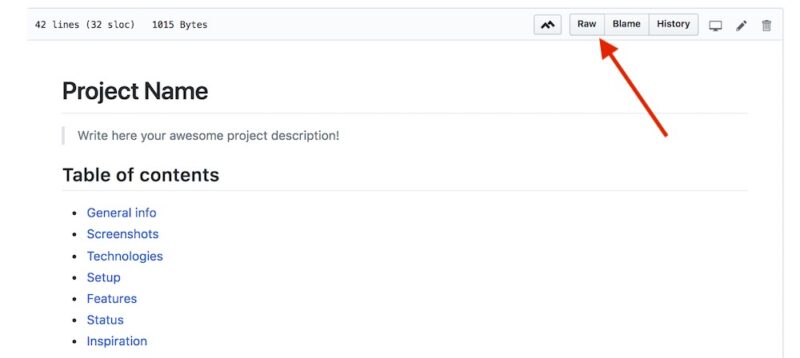
GitHub hosts millions of projects. Developers scroll quickly. Curiosity is fragile. A README often has only seconds to communicate relevance.
A good README:
- Reduces confusion
- Accelerates onboarding
- Encourages contributions
- Builds trust
- Improves long-term maintenance
In practical terms, it saves time. For everyone involved.
Future contributors, new team members, and even the original author months later, will rely on the README to remember how things fit together.
The Quiet Contract Between Author And Reader
Every README forms an unspoken contract. The author promises clarity, honesty, and guidance. The reader offers attention and curiosity.
When the contract holds, collaboration feels easy. When it breaks, frustration grows quickly.
A great README respects that relationship.
The Mental Flow Of A Reader
Before writing a single sentence, it helps to picture how someone approaches a repository.
Most visitors follow roughly the same internal sequence:
- What is it?
- Why does it exist?
- Can I use it?
- How do I start?
- Where do I go if something breaks?
A well-structured README follows that same flow. It never forces readers to hunt for basic answers.
A Practical Structure That Works
Almost every strong README shares a familiar backbone. The names of sections change, the length shifts, yet the underlying architecture remains remarkably consistent.
| Section | Purpose |
| Title and short description | Instant orientation |
| Value explanation | Relevance |
| Installation | Entry point |
| Usage | Real behavior |
| Configuration | Flexibility |
| Contribution | Community growth |
| Testing | Reliability |
| Roadmap | Direction |
| License and support | Legal and human context |
When arranged in that order, the document feels intuitive.
Writing The Opening That Hooks Without Hype

The title should always be the project name. Nothing clever. No slogans. Just the name.
Directly beneath it sits the short description. One or two sentences only.
The best descriptions use precise language. They avoid fluff. They answer the question a reader cares about most: what does the project actually do?
Strong example in prose:
A lightweight job scheduler for distributed systems that coordinates recurring tasks with fault tolerance and horizontal scaling.
That single sentence communicates purpose, audience, and benefit.
Explaining Value In A Calm, Human Way
After the description, a short explanation helps frame why the project exists.
No marketing. No exaggeration. Just context.
A paragraph like the following sets expectations naturally:
The project was built to solve recurring scheduling problems in environments where reliability matters and downtime is costly. It provides a simple interface while handling coordination and recovery behind the scenes. Teams use it to automate background jobs, data pipelines, and maintenance tasks across distributed systems.
The reader now knows whether the project fits their world.
A small table can reinforce the message.
| Challenge | How The Project Helps |
| Distributed job failures | Automatic recovery |
| Task coordination | Central scheduling |
| Scaling concerns | Horizontal support |
Clarity grows.
Installation That Feels Safe And Predictable

Installation sections deserve serious care. Many projects lose visitors here.
A calm paragraph works better than a long checklist:
The project installs through standard package management tools and requires a modern runtime environment. Optional components enable advanced features such as persistence and external coordination. Once installed, initialization follows conventional patterns used across similar libraries.
Then summarize requirements:
| Component | Requirement |
| Runtime | Current stable |
| Storage | Optional |
| Network access | Required for clustering |
Readers feel oriented and confident.
Showing Real Usage Without Overload
After installation, readers want to see what working with the project feels like.
Describe real workflows.
A paragraph can convey far more than a raw example:
In a typical application, the scheduler starts during service initialization. Tasks register themselves with execution rules and failure policies. When conditions are met, the scheduler triggers execution, monitors completion, and retries automatically when failures occur. Developers interact with a small surface area while the system manages coordination behind the scenes.
That explanation makes behavior tangible.
At this stage, many teams also review their documentation quality with internal tools such as readability tests, style analyzers, or even an AI checker to confirm tone consistency and technical clarity before publishing. Documentation often benefits from that final pass, especially when multiple contributors have written different sections over time.
Configuration That Guides Rather Than Buries

Configuration often overwhelms readers. The goal is to offer control without drowning them.
A table keeps things digestible.
| Setting | Purpose | Common Scenario |
| Retry policy | Handles failures | Unstable networks |
| Storage backend | Controls persistence | Production deployments |
| Concurrency limit | Prevents overload | Resource control |
Follow with a paragraph explaining tradeoffs. People care less about every possible option and more about which ones matter in practice.
Contribution As An Invitation
Contribution guidelines reveal a project’s personality.
A welcoming paragraph works best:
Contributors begin by forking the repository and creating a dedicated branch for each change. All new features and fixes should include appropriate tests and follow the formatting rules enforced by the automated pipeline. Before opening a pull request, contributors are encouraged to run the full test suite locally and confirm documentation remains accurate.
That tone feels collaborative and clear.
Testing Signals Reliability
A brief testing section communicates professionalism.
Describe how testing fits into development. Mention automation. Mention coverage expectations. Keep it short.
Trust grows.
Roadmap Without Promises
A roadmap offers direction without rigid commitments.
| Area | Focus |
| Scalability | Improved throughput |
| Developer experience | Better diagnostics |
| Integrations | Expanded platform support |
Readers appreciate transparency.
License And Support As Foundations
State the license clearly. Provide contact paths. These sections ground the project legally and socially.
A README feels incomplete without them.
Writing Style That Feels Human
Great technical writing does not read like a manual. It feels like a thoughtful conversation.
- Use varied sentence lengths.
- Prefer concrete words.
- Avoid buzzwords.
- Write honestly about limitations.
Small hesitations, natural phrasing, and clear rhythm keep readers engaged.
Keeping The README Alive
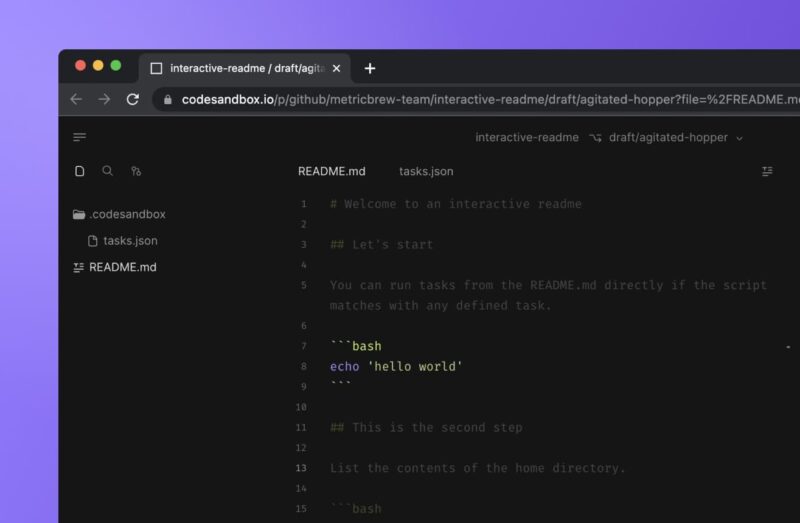
READMEs decay quietly. Features change. Interfaces evolve. Examples drift.
Healthy projects treat documentation as infrastructure.
- When releases ship, documentation updates.
- When confusion appears in issues, documentation improves.
- When onboarding feels slow, documentation evolves.
A README reflects project health as clearly as any metric.
Signals Readers Notice Immediately
Even before reading deeply, people register quality signals:
- Formatting consistency
- Clear organization
- Up-to-date content
- Thoughtful wording
- Human tone
Those signals influence trust more than many realize.
When The README Grows Too Large
As projects mature, the README should remain the front door.
Advanced topics belong in separate guides. Deep references fit better in documentation folders. Tutorials deserve their own space.
The README stays focused on orientation and flow.
Measuring Success In Quiet Ways
Great documentation reveals itself through behavior.
| Observation | Meaning |
| Quick onboarding | Clear guidance |
| Fewer repeated questions | Effective explanation |
| Steady contributor growth | Welcoming structure |
When readers succeed smoothly, the README is doing its job.
Final Thoughts
A README is not just a file. It is the voice of a project speaking across time. It guides future teammates, supports curious strangers, and protects maintainers from unnecessary confusion.
Writing one well is an act of respect.
Clear writing builds confidence.
Confidence builds collaboration.
Collaboration builds lasting software.
Few files in a repository carry more quiet influence than the README. Writing it with care pays dividends long after the commit is pushed.